

If you’ve ever tried to print a shipping label only to discover the layout was wrong, the barcode wasn’t readable, or the text overlapped, you’re not alone. Working with ZPL (Zebra Programming Language) files can be frustrating — especially when you can’t easily see what your label will look like before it hits the printer.
This is where an online ZPL viewer becomes a game-changer. Instead of relying on a physical printer or complicated local software, you can preview your ZPL files directly in your browser. Tools like a cloud ZPL viewer or ZPL II viewer render your label in seconds, so you can validate formatting, troubleshoot errors, and make changes before wasting a single label.
In this comprehensive guide, we’ll explore everything you need to know — from how ZPL works to the best ways to preview and test it online. Whether you’re a developer, logistics manager, or warehouse operator, by the end of this article you’ll understand exactly how to streamline your label workflow.
1. What Is ZPL and Why It Matters

ZPL (Zebra Programming Language) is a command-based language created by Zebra Technologies for designing and printing labels. It allows you to define label layouts, add barcodes, images, text, and other graphical elements using simple text commands.
For example, a ZPL file might specify:
- The size and orientation of the label.
- Where each element (text, barcode, image) should appear.
- Fonts, barcode symbologies, and formatting.
This language is widely used in logistics, healthcare, retail, and manufacturing, where accurate labeling is crucial. The problem is that ZPL isn’t designed to be seen — it’s meant to be interpreted by the printer. That means you often don’t know if the label looks right until you print it.
An online ZPL viewer solves this by rendering the label layout directly in the browser. It transforms ZPL code into a visual preview, so you can catch errors before they cause costly reprints.
2. Why You Need an Online ZPL Viewer

Here are some reasons why thousands of teams now use cloud ZPL viewers instead of relying solely on hardware:
- No printer required: Preview labels anywhere — even if you don’t have a Zebra printer on hand.
- Instant feedback: Upload your .zpl file and see the output immediately.
- Save time and money: Avoid trial-and-error printing, which wastes labels and ink.
- Debug faster: Identify command errors, alignment issues, or missing fields before deployment.
- Work remotely: Since the viewer runs in your browser, you can review labels from any device.
If you’re using tools like Labelary online ZPL viewer, ZPL II viewer download, or Zebra ZPL file viewer, you’re already leveraging this approach — but there are now more advanced solutions that combine speed, accuracy, and collaboration features.
3. How an Online ZPL Viewer Works (Step-by-Step)
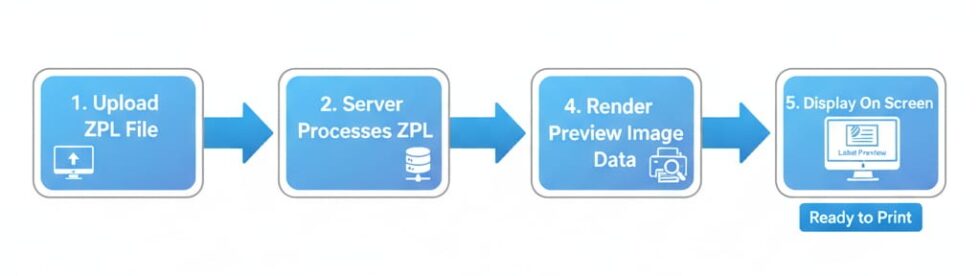
The beauty of a ZPL file viewer is how simple it is to use. Here’s the typical process:
- Upload or paste your ZPL code – Most viewers support drag-and-drop or code paste directly into a browser text box.
- Automatic rendering – The viewer interprets ZPL commands and converts them into a high-resolution image preview.
- Adjust preview settings – Change DPI, label size, or print density to match your actual printer environment.
- Validate the design – Review fonts, barcode size, alignment, and graphic placement before printing.
Some advanced ZPL code viewers even highlight syntax errors or unsupported commands, helping you troubleshoot issues before they cause printer errors.
4. Real-World Use Cases
Online ZPL viewers are useful across a wide range of industries and workflows:
- E-commerce warehouses: Check carrier labels generated by platforms like Shopify, WooCommerce, or ShipStation.
- Logistics & distribution: Preview bulk-generated pallet or shipment labels.
- Healthcare: Ensure medical label accuracy for specimen tracking or patient identification.
- Retail: Review shelf tags and pricing labels before deployment.
- Developers: Test dynamically generated ZPL output in software integrations without needing a printer.
Whether you’re using a zebra zpl viewer for one-off checks or integrating a zpl file viewer download into a larger system, the benefit is the same: fewer surprises and more reliable printing.
5. Common Problems with ZPL Labels (and How Viewers Solve Them)
Here are some of the most common issues teams face when working with ZPL — and how an online viewer helps:
| Problem | Cause | Solution |
| Barcode too large or small | Incorrect module size command | Preview and adjust before printing |
| Text overlaps or cuts off | Label dimensions too small | Use viewer to check spacing |
| Elements misaligned | Incorrect X/Y coordinates | Real-time visualization shows positioning |
| Printer throws errors | Unsupported ZPL commands | Viewer flags syntax errors |
| Low print quality | DPI mismatch | Preview with correct DPI settings |
By validating labels before printing, you reduce wasted materials and prevent costly downtime.
6. ZPL I vs. ZPL II: What’s the Difference?
Zebra introduced ZPL II as an enhanced version of the original ZPL language. Here’s how they compare:
| Feature | ZPL I | ZPL II |
| Command structure | Basic | More advanced, modular |
| Label design control | Limited | Detailed control |
| Compatibility | Older printers | All modern Zebra printers |
| Error handling | Minimal | Improved syntax handling |
| Best for | Legacy systems | Most modern use cases |
If you’re unsure which version your system uses, most online viewers can auto-detect the syntax. Tools labeled as ZPL II viewer or offering ZPL II print preview are ideal for modern workflows.
7. Choosing the Right ZPL Viewer
Not all ZPL viewers are created equal. Here’s what you should look for when choosing one:
- ✅ Cloud-based access: So you can preview files from anywhere.
- ✅ Full ZPL I & II support: Compatibility ensures future-proofing.
- ✅ Real-time rendering: Instant feedback is essential for fast workflows.
- ✅ Syntax validation: Prevents errors before they hit the printer.
- ✅ Advanced controls: DPI, label size, margins, and rotation adjustments.
If you see features like “cloud zpl viewer,” “labelary online zpl viewer,” or “zebra zpl file viewer,” those tools usually check all the boxes.
8. Best Practices for Working with ZPL Files

Here are some expert tips to make your ZPL workflow more efficient:
- Keep code modular: Use reusable templates to reduce mistakes.
- Validate before printing: Always use a viewer to test formatting.
- Version control your labels: Store them in a Git repository or asset manager.
- Automate QA: If possible, integrate a viewer API to run checks during CI/CD builds.
- Use variable fields wisely: Minimize dynamic content errors by testing sample data.
9. Frequently Asked Questions (FAQ)
- What is a ZPL file?
A ZPL file is a plain-text file containing Zebra printer commands for designing and printing labels. - Do I need a Zebra printer to use a ZPL viewer?
No — a cloud ZPL viewer renders labels directly in your browser. - What’s the difference between ZPL I and ZPL II?
ZPL II is a more advanced, modern version with additional commands and features. Most new printers support it. - Can I preview ZPL code without downloading software?
Yes, tools like online ZPL viewer or labelary ZPL viewer require no downloads. - Is there a way to check my label before printing?
Yes. Upload your file to a zpl file viewer and review it visually. - Are online viewers secure?
Most viewers process files temporarily and do not store them, but always verify privacy policies. - Can I adjust DPI or label size in a viewer?
Yes — advanced viewers allow DPI changes, label width/height, and margin control. - Do online viewers support barcodes and QR codes?
Yes, they support standard barcode types and graphical elements. - Is there a free ZPL viewer?
Many free tools exist online — just search for terms like zpl ii viewer download or zebra zpl file viewer. - Can I use viewers for bulk validation?
Some tools offer APIs for automated testing, ideal for high-volume environments.
Previewing ZPL files used to be tedious and hardware-dependent. But with a modern online ZPL viewer, you can review, debug, and perfect your labels before they reach the printer — saving time, money, and frustration.
Whether you’re a developer writing ZPL commands or a logistics manager overseeing thousands of labels a day, browser-based preview tools are now essential for efficient, error-free printing.